
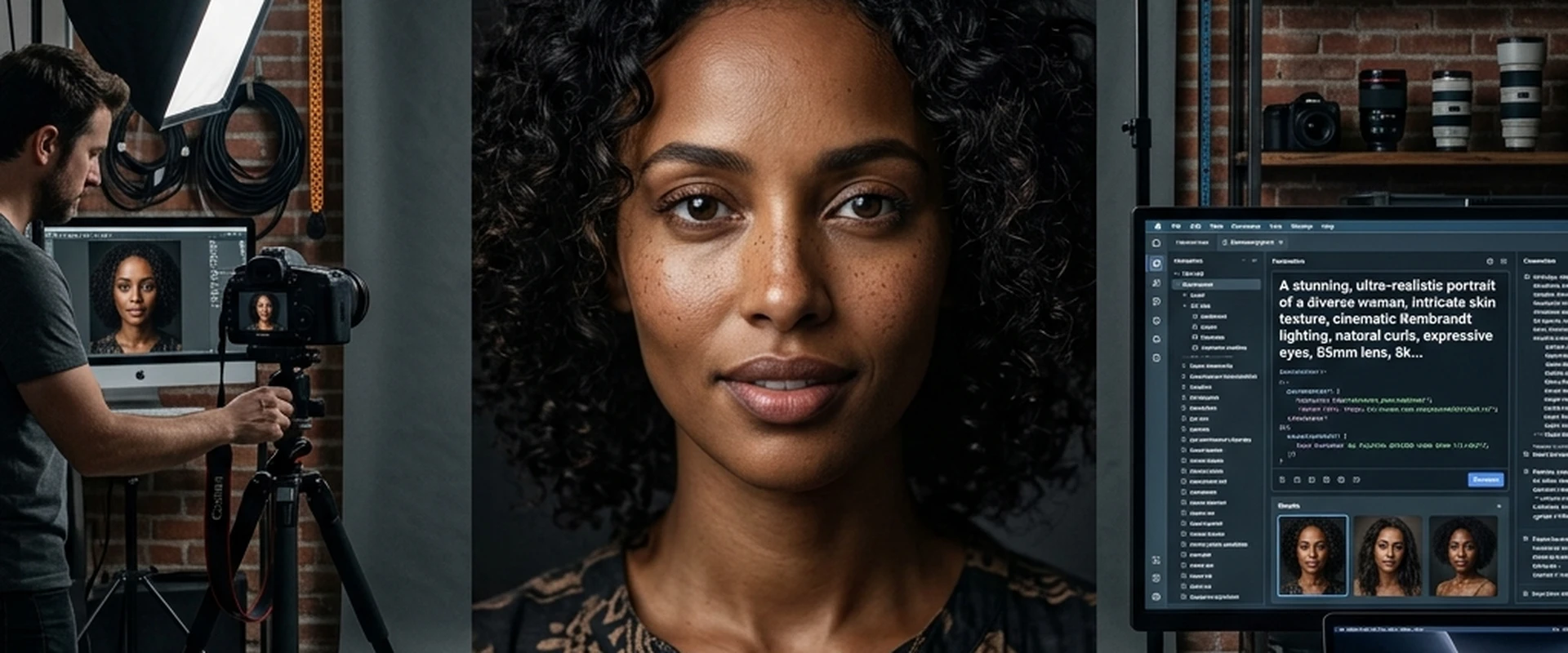
We are living in a golden age of digital creation. Just a few years ago, the idea of typing a few words into a computer and receiving a breathtaking, gallery-quality photograph in return felt like science fiction. Today, AI models like Google's Gemini have turned that fiction into an everyday reality.
However, if you have spent any amount of time playing around with AI image generators, you probably know that getting a face to look truly realistic is one of the hardest challenges. All too often, you end up with portraits where the skin looks like polished plastic, the eyes lack a soul, and the lighting feels artificial. Creating a portrait that makes viewers stop and ask, "Wait, is this a real photograph?" requires more than just asking the AI for "a picture of a person."
It requires the careful art of prompt engineering.
In this comprehensive guide, we are going to dive deep into the world of realistic portrait Gemini prompts. We will break down the mechanics of a perfect prompt, explore the terminology of professional photography, and provide you with actionable examples that you can use right away. Whether you are creating characters for a novel, mocking up corporate headshots for a web design project, or just experimenting with digital art, mastering these techniques will fundamentally change how you interact with Gemini.
The Anatomy of a Flawless Portrait Prompt
Before we get into specific examples, it is crucial to understand why certain prompts work while others fail. Gemini, like most advanced AI models, thrives on specificity. When you leave details ambiguous, the AI relies on its default training data, which often leads to generic, overly smoothed results.
A high-quality portrait prompt usually consists of five core layers:
1. The Subject: Who are we looking at? Age, ethnicity, gender, distinct facial features, and expression.
2. The Medium/Format: Are we mimicking a digital photograph, a vintage film camera, or a polaroid?
3. The Lighting: Where is the light coming from? Is it harsh, soft, colorful, or natural?
4. The Camera Settings: What lens is being used? What is the depth of field?
5. The Environment: What is happening in the background? Is it a studio sweep, a blurry city street, or a dense forest?
When you combine these five elements thoughtfully, you give the AI a highly specific blueprint. Let's break down each of these layers to see how you can manipulate them for maximum realism.
Layer 1: Defining the Subject with Imperfections
The biggest mistake beginners make is asking for a "beautiful" or "handsome" person. The AI interprets these subjective words by smoothing out all wrinkles, erasing pores, and creating perfectly symmetrical faces. The result? A mannequin.
Real human faces are imperfect. They have texture, asymmetry, and character. When writing your realistic portrait Gemini prompts, you need to actively ask for these imperfections.
Keywords to use:* Visible skin pores * Subtle freckles * Fine lines around the eyes (crow's feet) * Slight skin redness or natural uneven skin tone * Stray hairs catching the light * Micro-expressions (a slight squint, a hesitant smile, lips parted slightly)
Example difference:Bad Prompt: A beautiful woman looking at the camera.Good Prompt: A 35-year-old Mediterranean woman with subtle freckles across her nose, visible skin texture, and fine laugh lines, giving a genuine, slightly asymmetrical smile.
Layer 2 & 3: Lighting is Everything
Ask any professional photographer what the most important aspect of a portrait is, and they will tell you it is the light. Light dictates the mood, the depth, and the perceived realism of the image. Gemini understands photographic lighting terminology incredibly well. If you aren't specifying the lighting, you are leaving the most critical element up to chance.
Here are the most effective lighting setups to include in your prompts:
Rembrandt Lighting
Named after the famous painter, this technique creates a small, inverted triangle of light on the subject's cheek opposite the light source. It is moody, dramatic, and incredibly realistic.Prompt snippet: "...dramatic Rembrandt lighting, soft shadows on the left side of the face, a distinct triangle of light on the right cheek..."
Golden Hour Lighting
This refers to the period shortly after sunrise or before sunset. It provides a warm, soft, and directional light that makes skin glow naturally.Prompt snippet: "...shot during golden hour, warm amber sunlight hitting the side of the face, long soft shadows..."
Studio Strobe / Butterfly Lighting
Often used in beauty and fashion photography, the main light is placed directly above and in front of the subject, creating a butterfly-shaped shadow under the nose.Prompt snippet: "...high-end studio setup, butterfly lighting, softbox overhead, bright and crisp illumination..."
Cinematic / Neon Lighting
For a more modern, narrative feel, you can mix color temperatures.Prompt snippet: "...cinematic lighting, motivated by a blue neon sign off-camera, with a subtle warm rim light on the jawline..."
Layer 4: The Camera and Lens Specifications
To force Gemini to stop rendering images as "digital art" and start rendering them as "photographs," you need to speak the language of cameras.
Focal Length:The focal length changes the compression of the face. * 35mm lens: Shows more of the background, great for environmental portraits. Can slightly distort facial features if too close. * 85mm lens: The gold standard for portraiture. Flattering facial compression and excellent separation from the background. * 200mm lens: Extreme compression, throwing the background completely out of focus.
Aperture (Depth of Field):If you want the background to be blurry (which helps draw the eye directly to the realistic face), you need to specify a wide aperture.Prompt snippet: "...shot on an 85mm lens at f/1.4, incredibly shallow depth of field, sharp focus on the eyelashes, beautifully blurred background bokeh..."
Film Stocks:Mimicking specific film stocks adds a layer of grain and color grading that instantly tricks the brain into perceiving the image as a real, physical photograph.Prompt snippet: "...shot on Kodak Portra 400..." or "...Fujifilm Superia X-TRA 400 aesthetics, subtle film grain..."
Top Realistic Portrait Gemini Prompts (Categorized)
Now that we understand the theory, let us look at some highly optimized, copy-and-paste prompts you can use. Feel free to tweak the subjects to fit your specific needs.
1. The Professional Corporate Headshot
If you are building a website layout and need realistic filler faces that don't look like cheesy stock photos, this is your go-to prompt.
The Prompt:
"A highly realistic, unretouched corporate headshot of a 42-year-old South Asian man. He is wearing a tailored charcoal grey suit with a crisp white shirt, no tie. Shot against a textured, dark gray seamless paper backdrop. Professional studio lighting with a large softbox from the top left, creating gentle, flattering shadows. Shot with an 85mm portrait lens, f/5.6 for deep focus across the entire face. Visible skin pores, subtle stubble, neutral but approachable expression, looking directly into the lens. Ultra-detailed, 8k resolution, photorealistic."
2. The Moody Street Photography Portrait
Street photography relies on available light and capturing candid, raw emotion.
The Prompt:
"A candid, documentary-style portrait of a 20-something woman with short, messy bleached blonde hair, standing on a bustling Tokyo street at night. She is illuminated solely by the glow of a nearby red neon sign, creating harsh, cinematic shadows across her face. Raindrops are visible on her leather jacket. Shot on a 35mm lens at f/1.8, shallow depth of field, with the background city lights rendered as large, soft bokeh balls. Subtle film grain, Fujifilm Pro 400H color grading, raw emotion, slight look of exhaustion in her eyes."
3. The Natural "No-Makeup" Daylight Portrait
This prompt is excellent for testing Gemini's ability to render true-to-life skin textures without the crutch of heavy shadows.
The Prompt:
"An extreme close-up, highly detailed portrait of a 60-year-old Caucasian woman with deep laugh lines, sun-weathered skin, and striking pale blue eyes. She has no makeup on. Shot outdoors under bright, overcast skies providing soft, even, natural light. Shot on a 105mm macro lens, focusing sharply on the iris and the fine wrinkles around the eyes. Stray silver hairs blowing across her forehead. The background is a heavily blurred green meadow. Raw photograph, hyper-realistic, capturing genuine human texture."
4. The Vintage Editorial Style
Adding age to the photograph covers up any minor AI generation flaws by masking them with intentional degradation.
The Prompt:
"A 1970s vintage-style portrait of a young Black man with an afro, wearing a mustard yellow turtleneck. Shot on Kodak Tri-X 400 black and white film. Heavy film grain, slight vignette, medium contrast. He is sitting near a large window, natural light spilling across his face in a Rembrandt lighting pattern. Shot with a vintage 50mm manual focus lens, f/2.8. Authentic, soulful expression, looking slightly off-camera. Dust and scratches on the negative."
Advanced Prompt Engineering Techniques for Gemini
To truly master realistic portrait Gemini prompts, you need to push beyond the basics. Here are some advanced concepts to experiment with.
Utilizing Negative Space and Framing
Instead of just asking for a portrait, tell the AI how to frame the subject. "Rule of thirds framing, subject placed on the right side of the image looking left into negative space" creates a much more dynamic, professional composition than a standard dead-center mugshot.
Directing the Gaze
The eyes are the windows to the soul, especially in AI art. A portrait where the subject stares dead-center into the camera is powerful, but it can sometimes feel intimidating or artificial. Try directing the gaze: "Looking over the left shoulder," "staring blankly down at their hands," or "caught mid-glance looking at something off-screen." This implies a narrative happening outside the frame, drastically increasing realism.
The "Ugly" Prompting Technique
Some of the most successful prompt engineers intentionally ask the AI for things traditionally considered "ugly" to break the perfection algorithm. Asking for "tired eyes, slight under-eye bags, unkempt eyebrows, chapped lips, uneven lighting" forces Gemini to abandon its beauty filters and generate something raw and undeniably human.
Common Mistakes to Avoid When Prompting for Portraits
Even with the best formulas, things can go wrong. Here are the pitfalls you need to avoid.
1. Contradictory Terms:Asking for "bright sunlight" and "dark, moody shadows" in the same prompt confuses the AI. Pick a single lighting scenario and stick to it.
2. Overloading the Prompt:While detail is good, writing a 500-word essay can cause the AI to forget the main subject. Keep your prompts between 50 and 150 words. Focus on the most important aspects: Subject, Light, Lens, and Mood.
3. Ignoring the Background:A hyper-realistic face floating in a blurry, nonsensical, AI-generated void instantly ruins the illusion. Always specify the background, even if it is just "a solid beige studio wall" or "a blurred living room."
Synergizing Your Creative Workflow
Generating stunning images is just one piece of the puzzle. If you are building websites, running marketing campaigns, or managing an online business, you need a cohesive toolset to handle the technical side of your operations.
This is where integrating reliable utilities becomes essential. I highly recommend checking out Zero Server Tools for your broader web management needs. Whether you are optimizing your new AI-generated images for web speed, tracking your SEO progress, or managing your domain tools, having a centralized, easy-to-use platform saves you countless hours. Pair the stunning visuals you create in Gemini with the technical efficiency of Zero Server Tools, and you have a recipe for serious digital success.
Frequently Asked Questions (FAQs)
1. Can Gemini generate truly photorealistic human faces?Yes, absolutely. The latest iterations of Google Gemini are highly capable of generating photorealistic human faces. The key difference between a cartoonish output and a photorealistic one lies entirely in the prompt. By specifying camera lenses, film types, lighting, and skin textures (like pores and imperfections), you can guide Gemini to output incredibly lifelike results.
2. How do I avoid "plastic" or over-smoothed skin in my AI portraits?AI models default to "perfect" skin because that is heavily represented in their training data (retouched magazine covers, Instagram filters). To counter this, you must explicitly ask for imperfections in your prompt. Use phrases like "visible skin pores," "unretouched skin," "subtle blemishes," "fine lines," and "natural skin texture."
3. What is the best aspect ratio for a portrait prompt?While you can generate portraits in square (1:1) formats, traditional portrait photography looks best in vertical formats. When interacting with AI image generators, specifying an aspect ratio of 4:5 or 9:16 usually results in better framing, giving the subject breathing room and allowing for accurate rendering of the shoulders and torso.
4. Are there restrictions on generating real people's faces with Gemini?Yes. Google has strict safety and ethical guidelines built into Gemini. It is designed to block prompts that attempt to generate deepfakes, non-consensual imagery, or highly accurate likenesses of real, identifiable people (such as politicians, celebrities, or private citizens). Your prompts should focus on generating fictional people with specific characteristics rather than real individuals.
5. Why do my AI portraits sometimes have weird eyes or mismatched pupils?Rendering eyes is notoriously difficult for AI because the geometric precision required is immense. If you encounter weird eyes, try adding keywords like "perfectly symmetrical pupils," "sharp focus on the iris," or "detailed catchlights in the eyes." Often, ensuring the prompt specifies high resolution and a high-quality lens (like "85mm macro") forces the AI to dedicate more rendering power to those small details.
6. Does the prompt order matter?Generally, yes. Most AI models give heavier weight to the words at the beginning of the prompt. It is usually best practice to start with the main subject (e.g., "A hyper-realistic portrait of a 40-year-old man..."), followed by the environment, the lighting, and finally the camera specifications and technical details.
Conclusion
Creating realistic portraits with Google Gemini is a fascinating intersection of technology and traditional photography knowledge. By stepping away from simple, generic requests and embracing the vocabulary of a professional photographer, you unlock the true potential of the AI.
Remember that perfection is the enemy of realism. Embrace the flaws, command the lighting, and dictate the camera settings. The more you experiment with negative space, diverse demographics, and varied lighting setups, the more natural and compelling your generated portraits will become.
Prompt engineering is not just about telling a machine what to do; it is about painting a vivid picture with words so the machine has no choice but to show you exactly what you envisioned. So, fire up Gemini, use the formulas provided above, and start creating portraits that will make people look twice. And do not forget to streamline the rest of your web development and SEO tasks by utilizing the resources at Zero Server Tools. Happy prompting!